A practical walkthrough of two-way communication between a React Native/Expo app and an Apple Watch app: turning the Digital Crown on the watch updates the phone, and the phone pushes state back to the watch. It uses Apple's WatchConnectivity framework on the native side and a TurboModule on the React Native side.
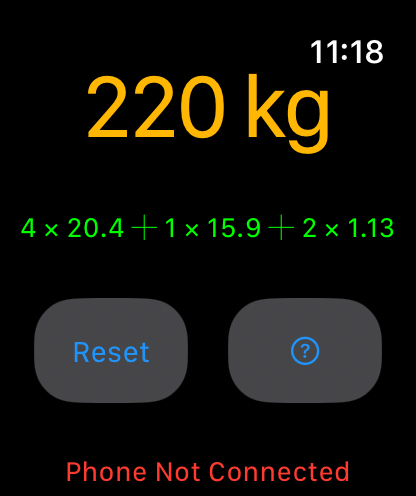
Everything here comes out of barlog, a barbell plate calculator. The watch shows a target weight you scroll with the crown; the phone shows which plates to load.


Versions and Relevant Files
Code here targets the current toolchain:
- React Native: 0.86
- Expo SDK: 57
- React: 19.2
- iOS deployment target: 15.1
- watchOS deployment target: 10.0
- Xcode: 16.2 or newer
The linked repository is still pinned to React Native 0.76.7 / Expo SDK 52 and uses the older event API. If that is what you are running, the second-to-last section maps the old shape onto the new one.
barlog/
├── WatchModule.ts                        # JS wrapper around the TurboModule
├── src/
│   ├── native/watch-connectivity/specs/
│   │   └── NativeWatchConnectivity.ts    # TurboModule spec (codegen input)
│   └── hooks/
│       └── useWatch.tsx                  # React hook consumers actually use
├── targets/watch/                        # watchOS sources, outside ios/
│   ├── expo-target.config.js
│   ├── ContentView.swift
│   └── WatchConnectivityManager.swift
└── ios/
    ├── WatchConnectivity/
    │   ├── RCTWatchConnectivityModule.h
    │   └── RCTWatchConnectivityModule.mm  # WCSession delegate + native module
    └── barlog/AppDelegate.mm
Architecture
Three layers, each owning one job. The watch talks to WatchConnectivity, WatchConnectivity talks to the native module, and the native module talks to JavaScript.
flowchart TB
    subgraph WATCH["Apple Watch"]
        direction LR
        CV["ContentView.swift<br/>SwiftUI + Digital Crown"]
        WCM["WatchConnectivityManager.swift<br/>WCSessionDelegate"]
        CV <--> WCM
    end

    WCS(["WCSession · paired-device transport"])

    subgraph IOS["iOS Native"]
        RCTM["RCTWatchConnectivityModule.mm<br/>WCSessionDelegate + TurboModule"]
    end

    subgraph RN["React Native"]
        direction LR
        WMOD["WatchModule.ts<br/>null-safe wrapper"]
        HOOK["useWatch.tsx<br/>subscribe + send"]
        APP["Your components"]
        WMOD <--> HOOK
        HOOK <--> APP
    end

    WCM <--> WCS
    WCS <--> RCTM
    RCTM <--> WMOD

    classDef watchLayer fill:#262a25,stroke:#a3cb38
    classDef iosLayer fill:#24282a,stroke:#9dacb7
    classDef rnLayer fill:#2a2722,stroke:#ffc914
    class WATCH watchLayer
    class IOS iosLayer
    class RN rnLayer
Getting a watchOS target into an Expo app
This is the part that trips people up, and it happens before any of the code below matters. expo prebuild regenerates ios/, so a watch target added by hand in Xcode is gone the next time you run it. The target has to be declared as configuration.
@bacons/apple-targets is the config plugin for this:
npx expo install @bacons/apple-targets
npx create-target watch
That scaffolds targets/watch/ with an expo-target.config.js, a SwiftUI entry point, and preview assets. Your Swift sources live there, outside ios/, which is why they survive a clean prebuild:
/** @type {import('@bacons/apple-targets/app.plugin').Config} */
module.exports = {
  type: "watch",
  icon: "../../assets/icon.png",
  entitlements: {
    "com.apple.security.application-groups": ["group.dev.keiver.barlog"]
  },
  deploymentTarget: "10.0"
}
Add the plugin to app.json, then regenerate:
npx expo prebuild -p ios --clean
Two things worth knowing before you build:
- A watch app created this way needs its paired iOS app. It will not run standalone.
- The App Group entitlement is not required for WatchConnectivity messages, but you want it as soon as you need to share files or
UserDefaultsbetween the two targets.
Native module configuration
Codegen turns the TypeScript spec into native interfaces at build time. It is configured in package.json:
{
  "codegenConfig": {
    "name": "RCTWatchConnectivitySpec",
    "type": "modules",
    "jsSrcsDir": "src/native/watch-connectivity/specs",
    "android": {
      "javaPackageName": "dev.keiver.barlog.watchconnectivity"
    }
  }
}
The android block only names the package codegen would use. It does not create an Android implementation, and there is no Android equivalent of WatchConnectivity. Everything below is iOS-only, and the JavaScript has to be written accordingly.
The TurboModule spec
The spec is the contract. Codegen reads it and generates the Objective-C protocol the native module implements, so it is the only place the method and event shapes are declared.
src/native/watch-connectivity/specs/NativeWatchConnectivity.ts:
import type { TurboModule, CodegenTypes } from "react-native"
import { TurboModuleRegistry } from "react-native"

export type WatchUpdate = {
  weight?: number
  unit?: string
  label?: string
  logs?: string
}

export type WatchNumberEvent = {
  number: number
}

export interface Spec extends TurboModule {
  sendUpdateToWatch(update: WatchUpdate): Promise<{status: string}>

  // Codegen turns this into `emitOnWatchNumber:` on the native side.
  readonly onWatchNumber: CodegenTypes.EventEmitter<WatchNumberEvent>
}

// `get`, not `getEnforcing`: getEnforcing throws at import time when the module
// is missing, which is every Android build and every Expo Go session.
export default TurboModuleRegistry.get<Spec>("RCTWatchConnectivitySpec")
Two things changed here from the pattern you will find in most older tutorials:
addListener(eventName) and removeListeners(count) are gone. Those were the NativeEventEmitter handshake, and they were always no-op stubs that codegen forced you to declare. CodegenTypes.EventEmitter<T> replaces them with a typed event, and React Native generates both the native emit method and the JS subscription for you.
getEnforcing became get. getEnforcing throws the moment the module is imported if it is not registered, so a single import of this file crashes an Android build. get returns null instead, which the wrapper below handles.
The iOS native module
The module is both a WCSessionDelegate and a TurboModule. It owns the WCSession on the phone side, forwards outgoing messages to the watch, and emits incoming messages to JavaScript.
ios/WatchConnectivity/RCTWatchConnectivityModule.h:
#import <RCTWatchConnectivitySpec/RCTWatchConnectivitySpec.h>

// The `...SpecBase` class is generated by codegen. Inheriting from it is what
// gives you `emitOnWatchNumber:`.
@interface RCTWatchConnectivityModule
    : NativeWatchConnectivitySpecBase <NativeWatchConnectivitySpec>
@end
ios/WatchConnectivity/RCTWatchConnectivityModule.mm:
#import "RCTWatchConnectivityModule.h"
#import <WatchConnectivity/WatchConnectivity.h>
#import <React/RCTLog.h>

@interface RCTWatchConnectivityModule () <WCSessionDelegate>
@property (nonatomic, strong) WCSession *session;
@end

@implementation RCTWatchConnectivityModule

RCT_EXPORT_MODULE(RCTWatchConnectivitySpec)

+ (BOOL)requiresMainQueueSetup { return YES; }

- (instancetype)init {
  if (self = [super init]) {
    // isSupported is NO on iPad and on any device without a paired-watch
    // capability. Activating anyway throws.
    if ([WCSession isSupported]) {
      self.session = [WCSession defaultSession];
      self.session.delegate = self;
      [self.session activateSession];
    }
  }
  return self;
}

#pragma mark - Spec methods

- (void)sendUpdateToWatch:(JS::NativeWatchConnectivity::WatchUpdate &)update
                  resolve:(RCTPromiseResolveBlock)resolve
                   reject:(RCTPromiseRejectBlock)reject {
  WCSession *session = self.session;

  if (session.activationState != WCSessionActivationStateActivated) {
    reject(@"not_activated", @"WCSession has not finished activating", nil);
    return;
  }

  // Codegen turns the spec's `WatchUpdate` into a C++ struct. Optional numbers
  // arrive as std::optional, optional strings as a nullable NSString.
  NSMutableDictionary *payload = [NSMutableDictionary new];
  if (auto weight = update.weight()) {
    payload[@"weight"] = @(*weight);
  }
  if (NSString *unit = update.unit()) {
    payload[@"unit"] = unit;
  }
  if (NSString *label = update.label()) {
    payload[@"label"] = label;
  }
  if (NSString *logs = update.logs()) {
    payload[@"logs"] = logs;
  }

  if (session.isReachable) {
    // Live path: fastest, but only while the watch app is in the foreground.
    [session sendMessage:payload
            replyHandler:^(NSDictionary<NSString *, id> *reply) {
              resolve(@{@"status": @"delivered"});
            }
            errorHandler:^(NSError *error) {
              reject(@"send_failed", error.localizedDescription, error);
            }];
    return;
  }

  // Fallback: the watch is asleep or backgrounded. Application context is
  // coalesced to the latest value, which is exactly right for "current weight".
  NSError *error = nil;
  [session updateApplicationContext:payload error:&error];

  if (error) {
    reject(@"context_failed", error.localizedDescription, error);
  } else {
    resolve(@{@"status": @"queued"});
  }
}

#pragma mark - WCSessionDelegate

- (void)session:(WCSession *)session
    didReceiveMessage:(NSDictionary<NSString *, id> *)message
         replyHandler:(void (^)(NSDictionary<NSString *, id> *))replyHandler {
  NSNumber *number = message[@"number"];

  if (number == nil) {
    replyHandler(@{@"status": @"ignored"});
    return;
  }

  // Generated by codegen from `onWatchNumber` in the spec, and a no-op if
  // JavaScript has not subscribed yet.
  [self emitOnWatchNumber:@{@"number": number}];
  replyHandler(@{@"status": @"received"});
}

- (void)session:(WCSession *)session
    activationDidCompleteWithState:(WCSessionActivationState)state
                             error:(NSError *)error {
  if (error) {
    RCTLogError(@"WCSession activation failed: %@", error.localizedDescription);
  }
}

// iOS only, and not optional: when the user switches to a different paired
// watch the session deactivates, and you have to reactivate it to keep talking.
- (void)sessionDidBecomeInactive:(WCSession *)session {}

- (void)sessionDidDeactivate:(WCSession *)session {
  [session activateSession];
}

@end
The old RCTEventEmitter scaffolding, supportedEvents, startObserving/stopObserving, and sendEventWithName:body:, is all gone. emitOnWatchNumber: replaces it, and it is safe to call whether or not JavaScript has subscribed yet.
The JavaScript wrapper
The spec can be null, so nothing should import it directly. WatchModule.ts is the boundary where that gets handled once:
import { Platform } from "react-native"
import NativeWatchConnectivity, {
  type WatchUpdate,
  type WatchNumberEvent
} from "./src/native/watch-connectivity/specs/NativeWatchConnectivity"

const isAvailable = Platform.OS === "ios" && NativeWatchConnectivity != null

const WatchModule = {
  isAvailable,

  onWatchNumber: (callback: (event: WatchNumberEvent) => void) => {
    if (!NativeWatchConnectivity) {
      return {remove: () => {}}
    }
    return NativeWatchConnectivity.onWatchNumber(callback)
  },

  // Always returns a promise, even when unavailable, so callers can chain
  // without a platform check of their own.
  sendUpdateToWatch: async (update: WatchUpdate) => {
    if (!NativeWatchConnectivity) {
      return {status: "unavailable"}
    }
    return NativeWatchConnectivity.sendUpdateToWatch(update)
  }
}

export default WatchModule
export type { WatchUpdate, WatchNumberEvent }
Returning a resolved promise from the unavailable path matters more than it looks. A wrapper that returns undefined on Android turns every sendUpdate(...).finally(...) at the call site into a TypeError.
The React hook
useWatch subscribes to watch events and exposes a sender:
import { useEffect, useRef, useCallback } from "react"
import type { EventSubscription } from "react-native"
import WatchModule, { type WatchUpdate, type WatchNumberEvent } from "@/WatchModule"

interface UseWatchConfig {
  onNumberReceived?: (value: number) => void
  enabled?: boolean
}

export function useWatch({onNumberReceived, enabled = true}: UseWatchConfig) {
  // React 19 types require an initial value. `useRef<T>()` no longer compiles.
  const subscription = useRef<EventSubscription | null>(null)
  const isSending = useRef(false)

  // The callback lives in a ref so the effect below does not depend on it.
  // Without this, an inline arrow from the caller tears down and rebuilds the
  // native subscription on every single render.
  const handler = useRef(onNumberReceived)
  handler.current = onNumberReceived

  useEffect(() => {
    if (!enabled) return

    subscription.current = WatchModule.onWatchNumber((event: WatchNumberEvent) => {
      if (!event.number) return
      // Ignore the echo of an update we just pushed to the watch.
      if (isSending.current) return
      handler.current?.(event.number)
    })

    return () => {
      subscription.current?.remove()
      subscription.current = null
    }
  }, [enabled])

  const sendUpdate = useCallback(
    (update: WatchUpdate) => {
      if (!enabled) return

      isSending.current = true
      WatchModule.sendUpdateToWatch(update).finally(() => {
        isSending.current = false
      })
    },
    [enabled]
  )

  return {sendUpdate, isAvailable: WatchModule.isAvailable}
}
The isSending flag suppresses the echo when the phone pushes a value and the watch immediately reports the same value back. It is a pragmatic guard, not a correct one: it is a single boolean over an async round trip, so a genuine crown turn that lands inside that window is dropped. Tagging each message with an origin or a sequence number is the version that actually holds up.
The watch side
WatchConnectivityManager is the watch's mirror of the native module: it owns the session, publishes what arrives, and sends crown updates back.
import WatchConnectivity
import Combine

final class WatchConnectivityManager: NSObject, ObservableObject, WCSessionDelegate {
    static let shared = WatchConnectivityManager()

    @Published private(set) var isReachable = false
    @Published var receivedMessage: [String: Any] = [:]

    private let session = WCSession.default

    private override init() {
        super.init()
        guard WCSession.isSupported() else { return }
        session.delegate = self
        session.activate()
    }

    func send(number: Int) {
        guard session.activationState == .activated else { return }

        if session.isReachable {
            session.sendMessage(["number": number], replyHandler: nil) { error in
                print("Watch: send failed, falling back: \(error)")
                self.session.transferUserInfo(["number": number])
            }
        } else {
            // FIFO queue, delivered when the phone wakes up. Nothing is dropped.
            session.transferUserInfo(["number": number])
        }
    }

    // MARK: - WCSessionDelegate

    // Delegate callbacks arrive on a background queue. @Published drives SwiftUI,
    // so every mutation has to hop to the main queue or you get a purple runtime
    // warning at best and a torn UI at worst.
    func session(
        _ session: WCSession,
        didReceiveMessage message: [String: Any],
        replyHandler: @escaping ([String: Any]) -> Void
    ) {
        DispatchQueue.main.async {
            self.receivedMessage = message
            replyHandler(["status": "received"])
        }
    }

    func session(_ session: WCSession, didReceiveApplicationContext context: [String: Any]) {
        DispatchQueue.main.async { self.receivedMessage = context }
    }

    func sessionReachabilityDidChange(_ session: WCSession) {
        DispatchQueue.main.async { self.isReachable = session.isReachable }
    }

    func session(
        _ session: WCSession,
        activationDidCompleteWith activationState: WCSessionActivationState,
        error: Error?
    ) {
        DispatchQueue.main.async { self.isReachable = session.isReachable }
    }
}
Note that the watch implements didReceiveApplicationContext as well as didReceiveMessage. The native module falls back to application context when the watch is unreachable, and without that delegate method those updates arrive nowhere.
The SwiftUI view binds the crown to a value and publishes changes:
struct ContentView: View {
    @StateObject private var connectivity = WatchConnectivityManager.shared
    @State private var rotationValue: Double = 0
    @State private var displayLabel: String = "0"
    @State private var lastLogs: String? = nil
    @FocusState private var isFocused: Bool

    var body: some View {
        VStack {
            Text(displayLabel)
                .font(.system(size: 45))
                .foregroundStyle(.yellow)
                .focusable(true)
                .focused($isFocused)
                .digitalCrownRotation(
                    $rotationValue,
                    from: 0, through: 800, by: 1,
                    sensitivity: .medium,
                    isContinuous: false,
                    isHapticFeedbackEnabled: true
                )
                // watchOS 10 deprecated the single-argument closure. The two
                // argument form gives you the old value too.
                .onChange(of: rotationValue) { _, newValue in
                    connectivity.send(number: Int(newValue))
                }
                .sensoryFeedback(.selection, trigger: rotationValue)

            if let logs = lastLogs {
                Text(logs).font(.footnote).foregroundStyle(.green)
            } else {
                Text("Open app to see plates").font(.body)
            }

            if !connectivity.isReachable {
                Text("Phone Not Connected").font(.footnote).foregroundStyle(.red)
            }
        }
        .onAppear { isFocused = true }
        .onReceive(connectivity.$receivedMessage) { message in
            if let weight = message["weight"] as? Double, weight > 0 {
                rotationValue = weight
            }
            if let label = message["label"] as? String, !label.isEmpty {
                displayLabel = label
            }
            if let logs = message["logs"] as? String {
                lastLogs = logs
            }
        }
    }
}
On watchOS 10 and up, .sensoryFeedback() is built in, so the custom modifier that used to wrap WKInterfaceDevice.play(_:) behind an availability check is no longer needed.
Message flow
Both directions, end to end:
sequenceDiagram
    autonumber
    participant JS as useWatch
    participant MOD as Native module
    participant WCM as Watch manager
    participant CV as ContentView

    rect rgba(255, 255, 255, 0.035)
        Note over JS,CV: Phone to watch
        JS->>MOD: sendUpdateToWatch()
        alt watch reachable
            MOD->>WCM: sendMessage(_:)
        else watch asleep
            MOD->>WCM: updateApplicationContext(_:)
        end
        WCM->>CV: @Published receivedMessage
    end

    rect rgba(255, 255, 255, 0.035)
        Note over JS,CV: Watch to phone
        CV->>WCM: send(number:)
        WCM->>MOD: sendMessage / transferUserInfo
        MOD->>JS: emitOnWatchNumber()
        JS->>JS: onNumberReceived(n)
    end
Choosing a transport
WatchConnectivity gives you three ways to move a dictionary, and picking the wrong one is the most common reason a working demo falls apart on a real wrist. They are not interchangeable.
| API | Delivery | Use it when |
|---|---|---|
sendMessage(_:replyHandler:errorHandler:) |
Immediate, not guaranteed. Requires isReachable. From iPhone to watch, the watch app must be in the foreground; from watch to iPhone, iOS will wake a backgrounded app. |
You need it now and you can tolerate losing it. |
updateApplicationContext(_:error:) |
Guaranteed eventually, coalesced. Only the most recent dictionary survives; call it three times while disconnected and only the third arrives. | Current state, where stale values are worthless. |
transferUserInfo(_:) |
Guaranteed eventually, FIFO. Every dictionary is queued and delivered in order. | Events where each one matters, like a log of completed sets. |
The pattern that holds up in practice is sendMessage when reachable with one of the queued APIs as the fallback, which is what both sides above do. Reaching for sendMessage alone gives you an app that works perfectly in the simulator and silently stops the first time the user drops their wrist.
Two smaller traps worth knowing:
WCSession.isSupported()isfalseon iPad. CallingactivateSessionanyway raises an exception.isReachableis notisPaired. A paired, installed watch sitting on a charger is not reachable.
If you're on React Native 0.76
The event API changed in the 0.77 to 0.86 range. Everything else in this article, WatchConnectivity, the session lifecycle, the transport choice, is unaffected. Here is the mapping:
| React Native 0.76 | React Native 0.86 |
|---|---|
addListener(eventName: string): void and removeListeners(count: number): void in the spec |
readonly onWatchNumber: CodegenTypes.EventEmitter<WatchNumberEvent> |
iOS module extends RCTEventEmitter, declares supportedEvents, calls sendEventWithName:body: |
iOS module extends the generated ...SpecBase, calls emitOnWatchNumber: |
JS constructs new NativeEventEmitter(module) and calls .addListener(EVENT_NAME, cb) |
JS calls module.onWatchNumber(cb) directly |
Event names shared as constants through getConstants() |
Event names come from the spec, checked by the type system |
startObserving / stopObserving gate emission |
Emitting with no subscribers is a no-op, no gating needed |
The old approach still works on 0.86, so this is a migration you can take when it suits you rather than one the upgrade forces on you.
Conclusion
The interesting part of this was never the messaging. WCSession has been stable for years. What changed is that a typed spec now generates both ends of the event path, so an event you add in TypeScript produces a native emit method with a matching signature, and the class of bug where a JS listener quietly waits on a string that native never sends is gone.
The part still worth being careful about is delivery. sendMessage looks like the obvious choice and it is the one that will page you at two in the morning.
Corrections and suggestions are welcome, especially on the echo suppression, which I am not happy with.